


Have you noticed how, in this era of endless email threads, work chats and social media, talking to people actually feels harder, not easier?
Sure, everyone’s been there, thinking you just sent a quick, polite message to a coworker asking for some edits. Then… radio silence. Or worse, a cold “Okay.” 🥶 Later, you start wondering: did it sound too harsh?
Maybe the problem is that the person can’t take criticism well? But don’t jump to conclusions just yet. Take a second and read your message again. What words did you choose? How might someone on the other side of the screen interpret it, especially if they don’t interact with you much or aren’t used to your usual tone?
The issue might not be grammar or spelling (you did run it through WProofreader, right? 😉), but the tone you used. How did you get your message across?
In face-to-face talks, we rely on intonation, facial expressions, or the vibe in the room to convey our meaning. But in writing? None of that’s there. All we have is our words—how we put them together and the emotions between the lines.
That’s why tone of voice (ToV) isn’t just some marketing buzzword. It decides whether people get what you mean or totally miss the point. Even the most perfect, grammatically correct text can come off wrong if the tone doesn’t fit the situation. That’s exactly why tech that can “hear” tones is a total lifesaver.
Today, we’re gonna break down how ToV detection works in digital text correction tools and why this feature changes the game for spellcheckers.
What’s the tone of voice of your message?
Tone of voice helps us recognize not just what’s being said, but who’s saying it. Whether it’s a brand, a writer, or a friend texting you—it makes the message feel personal and familiar. It also reveals the writer’s distinct style, helping us sense who they are just by how they express themselves.
That’s exactly what we call tone of voice—it’s how your text “sounds”. Just like your real voice, it’s one of a kind. ToV carries all the feelings, moods and meaning you put into your writing. It’s what makes your words feel alive and personal.
Imagine reading the same message, but from two different people:
- “Please send me the report by the end of the day. It’s important for finishing the project.”
- “Hey! Don’t forget to send the report today so we can get everything done on time. If you need help, just holler!”
Both say the same thing, but they sound totally different. So, tone of voice is the combination of style, attitude, and emotion in your writing. Furthermore, it reflects your attitude and the relationship you want to build with your reader. The tone of your text can change not just how your words are understood, but how they move people to feel or act.
From a science perspective, nobody has come up with a clear, foolproof way to define tone of voice yet. That’s because it’s a complex and deeply subjective thing. ToV depends on context, communication goals, cultural nuances and even how a specific individual perceives a particular text. As a result, many experts see tone of voice as more of a marketing and copywriting concept rather than a pure linguistic one.
Nevertheless, specialists have identified several factors that influence a text’s overall tone:
- Word choice and how words combine
- Text rhythm (which includes sentence and paragraph length)
- Use of emojis and slang
- Punctuation choices
- Text structure and formatting
Together, all these elements create the unique “voice” of your writing—the vibe that readers pick up on almost without realizing it.
However, Nielsen Norman Group (NN/g) came up with a clear and simple way to figure out the tone a text can have. They broke it down into four key dimensions that help you spot the vibe:
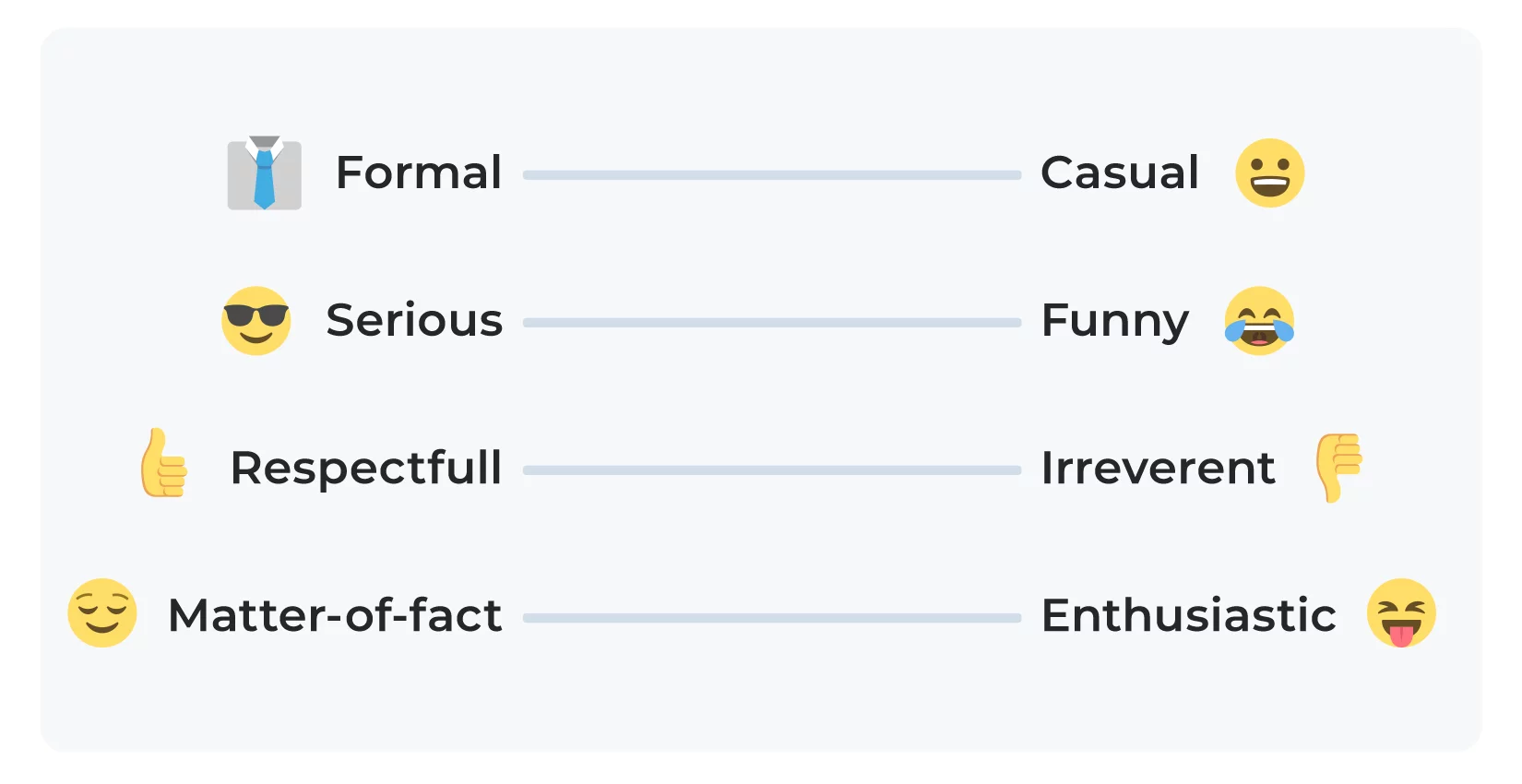
Each of these four dimensions is a scale. Your text can land anywhere on that scale—closer to one end, the other, or somewhere right in the middle. That means every message has its own unique “shade.” Putting it all together, you can think of a text’s tone as a point in a four-dimensional space. This way of looking at it helps brands and writers speak the same language as their readers.
Below, you’ll see how the same idea can sound totally different depending on the tone. We picked a simple example and showed how it changes depending on where it falls on each of the four NN/g scales.
Formal—Casual
Does the text sound like a business email or a message to a friend? Informal doesn’t always mean slangy, but it usually feels more relaxed and closer to everyday speech.
FormalCasualDear colleague, please submit the report by the end of the day. Thank you in advance.Hey! Don’t forget to shoot over the report today, okay? 😉Tone of voice variation across the NN/g scale: Formal vs Casual
Serious—Funny
Is the author trying to crack a joke, or are they keeping things straight and serious?
SeriousFunnyWe need to close this stage urgently. Waiting for your report by the end of the day.Save the project 🙏send me that report by tonight, or we’re doomed! 😅 Tone of voice variation across the NN/g scale: Serious vs Funny
Respectful—Irreverent
You can write with respect, or you can push the reader’s buttons to stir up emotions. It’s important to remember that a bold tone should help you stand out, not offend the reader.
RespectfulIrreverentI’d really appreciate it if you could send the report by tonight—it’s important.Look, we’re totally stuck without your report. Don’t make us beg, okay? Tone of voice variation across the NN/g scale: Respectful vs Irreverent
Matter-of-fact—Enthusiastic
Some people just lay out the facts, while others bring energy and genuine passion to the topic.
Matter-of-factEnthusiasticI’d really appreciate it if you could send the report by A report is required to complete the project. Please submit it by the end of the day.Can’t wait to get your report 🙂 It’s the last step, and we’re so close to wrapping it up! 🎉 Tone of voice variation across the NN/g scale: Matter-of-fact vs Enthusiastic
Figuring out your tone isn’t always easy. Sometimes we don’t even notice how the mood of our text shifts and that can totally change how people understand us. That’s where modern writing tools with tone-detection features step in.
They help you keep track of the “voice” in your message and make your writing clearer and more engaging for readers. Below, we’ll check out a few of these tools and see how well each one handles this challenge.
Comparison of tone detection features in digital spellcheckers
Today’s spellcheckers do way more than just fixing typos or throwing commas around. Some of them can check your tone of voice too. Honestly, that’s a total game-changer in our digital world.
Let’s face it: stiff, templated emails feel like they belong in the Stone Age. Social media flipped the script of our lives, so people basically live online now. They talk through messages, leave comments, send DMs. That means tone matters more than ever. You have to catch the vibe with other users, be on the same wavelength.
This is true of how brands communicate with their audiences. Because no one wants cold, robotic responses anymore. People expect brands to sound human and friendly. But the same goes for business emails, team chats, and everyday messages to friends. If your tone feels off, the whole thing can crash. You can slow down a project, ruin the mood, or just leave someone with a weird aftertaste. Even when your grammar’s spotless 😞
Now throw this into the global mix. English has pretty much taken over as the language for everything, from work to daily convos. And sure, you might speak it well. However, when you’re trying not to be too formal and wanna add some life to your words, it’s super easy to mess up. Jokes, slang, or talking about personal stuff—that’s always tricky ground. What sounds polite to one person might come off as rude to another.
That’s why tone-checking isn’t just some extra feature, but something you really need. Spellcheckers with this built-in act like a second pair of eyes. They don’t just help you figure out what you’re saying, but also how it comes across. They help you tweak your message so it fits the people you’re talking to or the situation you’re in.
So, we decided to put a few popular grammar and spellchecking tools to the test—specifically the ones that claim to offer tone detection. We grabbed their free versions and ran the same short message through each one to see how they handled tone.
Let’s take this sample text:
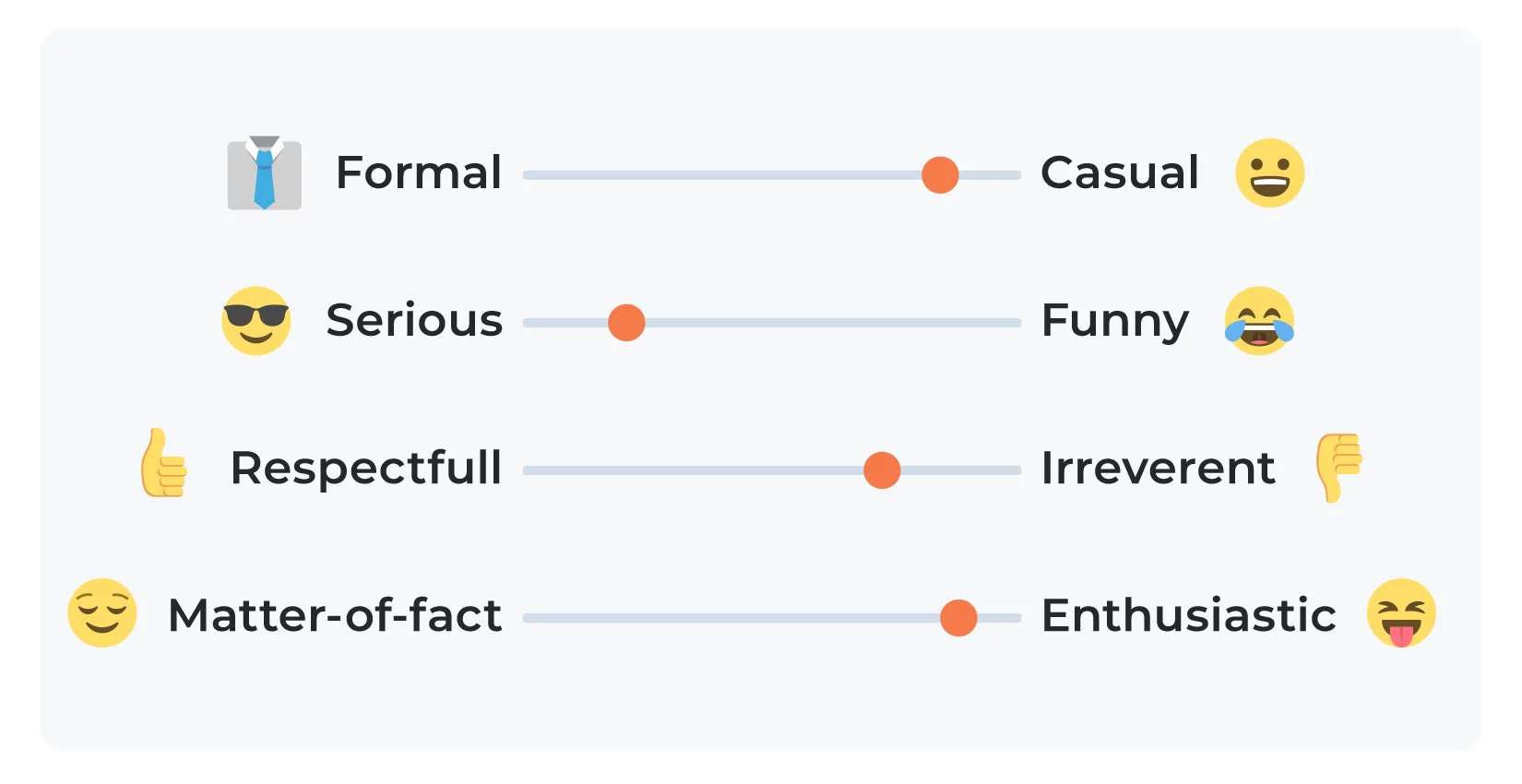
We’re not just going to disrupt the industry. We’re going to flip it on its head. While other companies are busy playing it safe, we’re taking risks that matter. Yes, some will call us crazy. Good. That means we’re onto something big. Join us or watch from the sidelines—either way, we’re changing the game.
If we break it down using the tone framework from NN/g, it might land around here:: serious, casual, irreverent, and enthusiastic.
Why?
- It feels very casual, there’s no corporate stiffness here. The sentences are short and punchy, with a conversational rhythm that sounds more like a startup pitch than a boardroom memo.
- At the same time, it’s serious because the message carries ambition and confidence. We’re talking about bold moves and real change in our company.
- Also, our text is a bit irreverent, because it challenges the status quo. There’s a rebellious vibe here that doesn’t care about being polite.
- And of course, it’s enthusiastic. You can feel the energy in every line. The voice doesn’t just inform—it rallies. It wants you to get fired up and either join the ride or step aside.
This is a great example of how tone lives between the lines—it’s not about what you say, but how you say it.
Let’s see how some of the most popular spellcheckers perform as of June 2025.

Grammarly rolled out its tone detector back in 2019. It works by mixing traditional rule-based logic with machine learning to analyze the emotional signals in your writing. Basically, it looks at your word choice, punctuation and the logic of how you build phrases.
The tool offers tone suggestions based on a set of predefined tones that, according to Grammarly, people often struggle to get right. Some of the tones it flags include things like accusatory, regretful, assertive, joyful, formal, encouraging and disapproving. Altogether, Grammarly has about 18 types of tone in total. It’s a pretty broad range, covering both emotional vibes and more stylistic shades like informal or unassuming.
However, Grammarly doesn’t give you a full-on tone spectrum or let you tweak the mood directly. It mostly just highlights the tone it thinks you’re hitting and offers edits to nudge it in a certain direction.
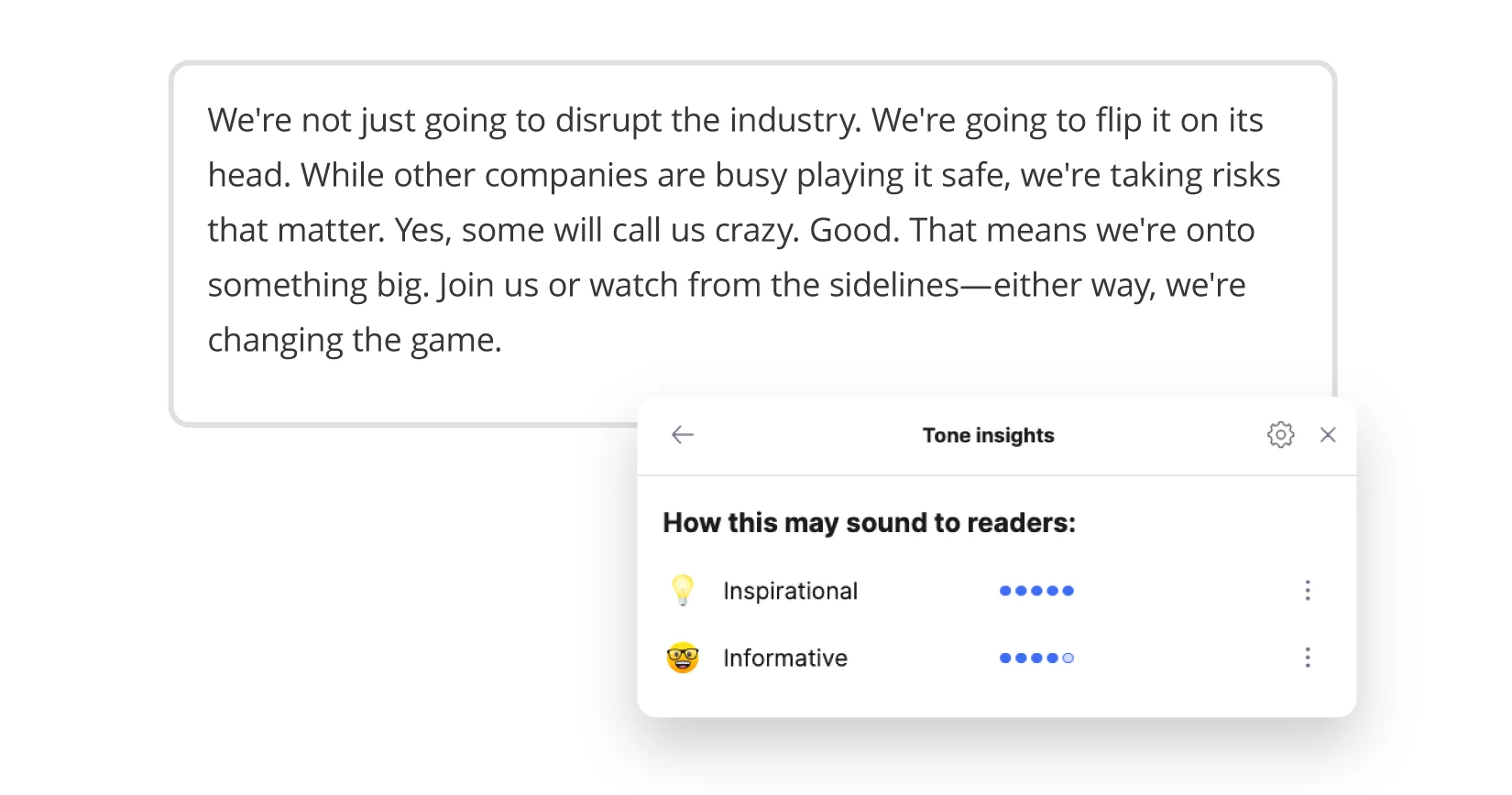
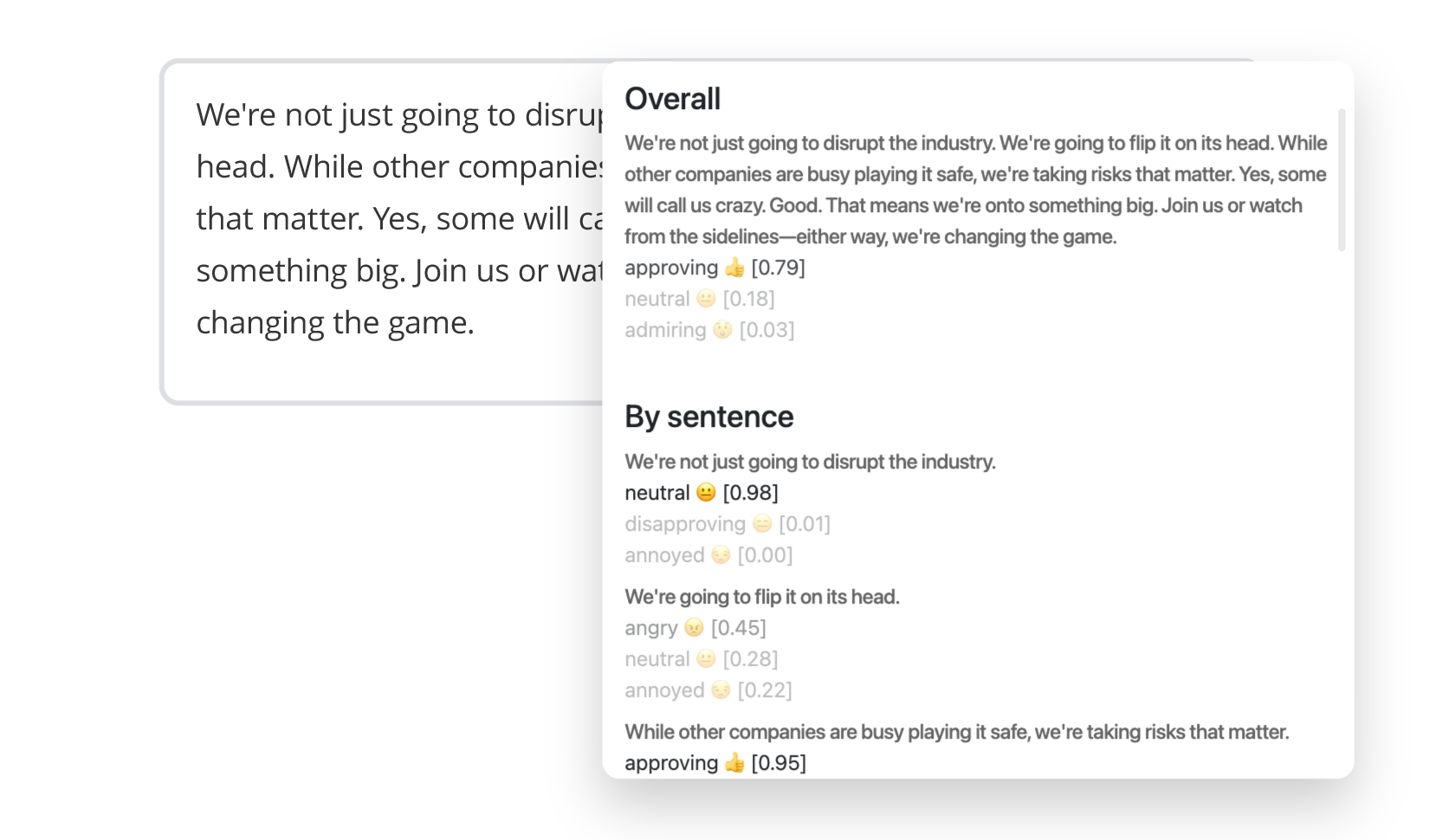
Sapling offers its own tone detection tool, available through an API. Unlike many other services that assign a single tone to an entire message, Sapling provides both an overall tone and a tone breakdown for each sentence. The system relies on a probabilistic model that estimates which emotions or moods are most likely present in the text.
Sapling’s tone library includes 28 distinct categories, from “admiring” and “curious” to “mournful” and “repulsed.” Each detected tone is returned with a probability score and an emoji, which adds a bit of expressiveness to the output, though the analysis itself remains strictly technical. Of course, “Neutral” is the most frequently assigned tone, which makes sense—the model tends to avoid overinterpreting emotional content.
Overall, the tool is more analytical than editorial. It doesn’t offer rewrite suggestions or advice on how to adjust tone. Instead, it simply reports how a piece of writing might come across emotionally.
Instead of chasing vague emotional signals, we went with something way more structured.
Soon, we’re getting ready to roll out our own tone detection tool with a bit of AI magic🪄 Wanna see how it works in WProofreader? Let’s go!
We use a four-dimensional tone model inspired by the NN/g. It looks at four core aspects of voice: humor, formality, respectfulness, and enthusiasm. When we mix and match those, we get more than just the mood of your text—we define actual communication styles. We’ve gone beyond the four core tone dimensions and built a system that captures 16 distinct tone of voice styles, reflecting that reflect how people actually write and connect.
Take Businesslike, for example: serious, formal, respectful, matter-of-fact. Or Friendly: funny, casual, respectful, matter-of-fact. Or take a look at Inspiring: funny, formal, irreverent, enthusiastic.
We’re developing the tone detection feature for WProofreader to recognize 16 different tone types like these.
Right now, the feature focuses on picking the one best-fit tone based on those four tone axes. But ToV is never reduced to one word. It’s always a complex mix.
So we’re already testing multi-class classification. The system can suggest several tone options at once, and each gives you a deeper and more flexible understanding of how your writing actually sounds.
And we’re not stopping there. We’ve also baked in sentiment analysis (positive, negative, neutral), emotion detection and a check for tone alignment—basically, making sure the tone you’re using fits the goal of your message.
That’s why our WProofreader detection stops being a fun little add-on🧐
It starts acting like real feedback from a professional editor.
WProofreader is here to help you understand the message hidden behind your words.
So, let’s see how different text-checking tools handle the tone in our sample.

*Please note: this is a preview of our current tone detection UI in action. We’re continuously refining this feature, so the final look may evolve as we roll out further updates 😉
Our exampleWProofreaderGrammarlySapling AIWe’re not just going to disrupt the industry…EnthusiasticInspirational
InformativeApproving Neutral
AdmiringClassification approachCommunication styles based on 4D model by the NN/gEmotional tone and sentiment tagsSentiment tagsTable Tone of voice comparison across popular text checkers1
- Grammarly read the text as inspirational. That’s a solid emotional hit, no doubt, but the classification remains fairly one-dimensional, with no real breakdown of style or delivery.
- Sapling returned three tags: approving, neutral, and admiring. You can sense some tonal tension here—which makes sense, given the provocative nature of the text. However, it also shows that Sapling relies mostly on sentiment analysis, without distinguishing between different communicative styles.
- WProofreader identified the tone as positive sentiment with strong anticipation and moderate joy, giving the overall text an enthusiastic feel. So, it doesn’t just pinpoint the emotional vibe, but also shows how different shades of feeling work together to create that punchy, upbeat tone. That’s possible thanks to the four-dimensional NN/g model, which is at the core of WProofreader’s tone classification system.
And this is just a small part of WProofreader’s broader functionality, designed to make working with all kinds of texts noticeably easier 😉
WProofreader multilingual grammar check solution
WProofreader is a secure and all-in-one digital spellchecker that supports over 20 languages.
You can pick the version that fits your workflow best:
✅ WProofreader SDK is perfect for developers, website owners and anyone working in web development. It’s a ready-made solution for spell checking in WYSIWYG editors like CKEditor, Froala, TinyMCE, and Quill. You can also get it as a standalone API. Whether you prefer self-hosting (on-prem or in a private cloud) or prefer the cloud deployment option, it’s flexible enough to work with either.
✅ WProofreader browser extension is a great choice for individual users who write documents, emails or other content in multiple languages. It checks spelling and grammar for both individuals and teams. On the free plan, your requests go through our cloud setup. When you decide to upgrade to the Business plan, you’ll be able to deploy it on your own servers.
With any version of WProofreader you choose, you will have access to:
- Real-time correction in 20+ languages, including AI-based English, German, and Spanish
- Autocorrect and autocomplete features for English and dialects
- Automatic language detection
- Organization-wide and user custom dictionaries
- Specialized medical lexicon for English, Spanish, French, and German
- Legal lexicon is available for English and its dialects
- Inclusive language recommendations
- Anglicism and foreign word detection
- Style guide builder
- The tone detection feature is just one element of our AI writing assistant 🪄.
This generative AI is built to streamline your writing process: from paraphrasing to content creation. The WebSpellChecker team has carefully crafted and tested a variety of prompt presets tailored to everyday writing needs.
With just a few clicks, using a set of predefined prompts, you can give your text a fresh spin: make it more formal or more casual, summarize long fragments, or simply clean up the grammar and spelling. And we’re already working on additional tone detection features like the upcoming ‘make my text sound like… ’ preset rewrite options😌
The functions of the AI writing assistant 🪄 are available in the following languages: English, German, Spanish, Portuguese, French, Dutch and Swedish.
To use the AI writing assistant, just highlight the text you want to work with and hit the WProofreader AI writing assistant 🪄 badge. From there, pick a prompt and let the magic happen.
You can try all these features with our demo.

WProofreader AI writing assistant
Rewrite and text generation for business and individual users.
Summary
Tone of voice is that invisible thread that connects the writer to the reader. It helps build trust, deliver the message clearly and avoid misunderstanding. Nowadays, when so much of our communication is written, knowing how to use and understand tone is key if you want to get your message across clearly.
There’s still no accepted method for identifying ToV in writing. But research like the NN Group’s four-dimensional model offers a strong theoretical foundation to move in that direction.
We ran a comparison test to see how different grammar and spelling tools handle tone detection. And the takeaway is pretty clear: most tools focus on emotions and mood, but rarely go deeper into the communication style or tonal structure behind the message.
WProofreader stands out because it tries to capture not just what is being said, but how it’s being said. While all tools have different goals, WProofreader’s multidimensional model allows for a more layered analysis. That means you get deeper, more insightful feedback on your text.
Want to get the most out of WProofreader? Reach out — we’re here to help.